Compare commits
2 Commits
0d77682f00
...
a06c2c78e9
| Author | SHA1 | Date | |
|---|---|---|---|

|
a06c2c78e9 | ||
|
|
6dc47050b6 |
182
components/v-tabs/readme.md
Normal file
182
components/v-tabs/readme.md
Normal file
@@ -0,0 +1,182 @@
|
|||||||
|
## 插件说明
|
||||||
|
|
||||||
|
> 这是 `v-tabs` 插件的升级版本,参数上有很大变动,支持 `H5` `小程序` `手机端`,如果是在之前的插件上升级的话,请注意参数的变更,触发的事件没有变更。
|
||||||
|
|
||||||
|
## 使用说明
|
||||||
|
|
||||||
|
### 1、最基本用法
|
||||||
|
|
||||||
|
- 视图文件
|
||||||
|
|
||||||
|
```html
|
||||||
|
<v-tabs v-model="current" :tabs="tabs" @change="changeTab"></v-tabs>
|
||||||
|
```
|
||||||
|
|
||||||
|
- 脚本文件
|
||||||
|
|
||||||
|
```js
|
||||||
|
export default {
|
||||||
|
data() {
|
||||||
|
return {
|
||||||
|
current: 0,
|
||||||
|
tabs: ['军事', '国内', '新闻新闻', '军事', '国内', '新闻', '军事', '国内', '新闻']
|
||||||
|
}
|
||||||
|
},
|
||||||
|
methods: {
|
||||||
|
changeTab(index) {
|
||||||
|
console.log('当前选中的项:' + index)
|
||||||
|
}
|
||||||
|
}
|
||||||
|
}
|
||||||
|
```
|
||||||
|
|
||||||
|
### 2、平铺整个屏幕
|
||||||
|
|
||||||
|
- 视图文件
|
||||||
|
|
||||||
|
```html
|
||||||
|
<v-tabs v-model="activeTab" :scroll="false" :tabs="['全部', '进行中', '已完成']"></v-tabs>
|
||||||
|
```
|
||||||
|
|
||||||
|
- 脚本文件
|
||||||
|
|
||||||
|
```js
|
||||||
|
export default {
|
||||||
|
data() {
|
||||||
|
return {
|
||||||
|
activeTab: 0
|
||||||
|
}
|
||||||
|
}
|
||||||
|
}
|
||||||
|
```
|
||||||
|
|
||||||
|
### 3、胶囊用法
|
||||||
|
|
||||||
|
- 视图文件
|
||||||
|
|
||||||
|
```html
|
||||||
|
<v-tabs v-model="current" :tabs="tabs" :pills="true" line-height="0" activeColor="#fff" @change="changeTab"></v-tabs>
|
||||||
|
```
|
||||||
|
|
||||||
|
- 脚本文件
|
||||||
|
|
||||||
|
```js
|
||||||
|
data() {
|
||||||
|
return {
|
||||||
|
current: 2,
|
||||||
|
tabs: [
|
||||||
|
'军事',
|
||||||
|
'国内',
|
||||||
|
'新闻新闻',
|
||||||
|
'军事',
|
||||||
|
'国内',
|
||||||
|
'新闻',
|
||||||
|
'军事',
|
||||||
|
'国内',
|
||||||
|
'新闻',
|
||||||
|
],
|
||||||
|
},
|
||||||
|
methods: {
|
||||||
|
changeTab(index) {
|
||||||
|
console.log('当前选中索引:' + index)
|
||||||
|
}
|
||||||
|
}
|
||||||
|
}
|
||||||
|
```
|
||||||
|
|
||||||
|
## 文档说明
|
||||||
|
|
||||||
|
### 1、属性说明
|
||||||
|
|
||||||
|
| 参数 | 类型 | 默认值 | 说明 |
|
||||||
|
| :---------------: | :-----: | :-------: | :----------------------------------------: |
|
||||||
|
| value | Number | 0 | 必传(双向绑定的值) |
|
||||||
|
| color | String | '#333' | 默认文字颜色 |
|
||||||
|
| activeColor | String | '#2979ff' | 选中文字的颜色 |
|
||||||
|
| fontSize | String | '28rpx' | 默认文字大小(rpx 或 px) |
|
||||||
|
| bold | Boolean | true | 是否加粗选中项 |
|
||||||
|
| scroll | Boolean | true | 是否显示滚动条,平铺设置 false |
|
||||||
|
| height | String | '70rpx' | tab 高度(rpx 或 px) |
|
||||||
|
| lineHeight | String | '10rpx' | 滑块高度(rpx 或 px) |
|
||||||
|
| lineColor | String | '#2979ff' | 滑块的颜色 |
|
||||||
|
| lineScale | Number | 0.5 | 滑块宽度缩放值 |
|
||||||
|
| lineRadius | String | '10rpx' | 滑块圆角宽度(rpx 或 px) |
|
||||||
|
| pills | Boolean | false | 是否开启胶囊 |
|
||||||
|
| pillsColor | String | '#2979ff' | 胶囊背景颜色(rpx 或 px) |
|
||||||
|
| pillsBorderRadius | String | '10rpx' | 胶囊圆角宽度(rpx 或 px) |
|
||||||
|
| field | String | '' | 如果 tabs 子项是对象,输入需要展示的键名 |
|
||||||
|
| bgColor | String | '#fff' | 背景色,支持 linear-gradient 渐变 |
|
||||||
|
| padding | String | '0' | 整个 tab padding 属性 |
|
||||||
|
| fixed | Boolean | false | 是否固定在顶部 |
|
||||||
|
| paddingItem | String | '0 22rpx' | 选项的边距(设置上下不生效,需要设置高度) |
|
||||||
|
|
||||||
|
### 2、事件说明
|
||||||
|
|
||||||
|
| 名称 | 参数 | 说明 |
|
||||||
|
| :----: | :---: | :--------------------------------: |
|
||||||
|
| change | index | 改变选中项触发, index 选中项的下标 |
|
||||||
|
|
||||||
|
## 更新日志
|
||||||
|
|
||||||
|
### 2020-09-24
|
||||||
|
|
||||||
|
1. 修复 `v-tabs` 第一次可能出现第一个标签显示不完整的情况
|
||||||
|
2. 修改了 `pages/tabs/order` 示例文件
|
||||||
|
|
||||||
|
### 2020-09-21
|
||||||
|
|
||||||
|
1. 修复添加 `fixed` 属性后,滚动条无效
|
||||||
|
2. 修复选项很少的情况下,下划线计算计算错误
|
||||||
|
3. 新增 `paddingItem` 属性,设置选项左右边距(上下边距需要设置 `height` 属性,或者设置 `padding` 属性)
|
||||||
|
|
||||||
|
**写在最后:**
|
||||||
|
欢迎各位老铁反馈 bug ,本人后端 PHP 一枚,只是应为感兴趣前端,自己琢磨,自己搞。如果你在使用的过程中有什么不合理,需要优化的,都可以在下面评论(或加我 QQ: 1207791534),本人看见后回复、修正,感谢。
|
||||||
|
|
||||||
|
### 2020-09-17
|
||||||
|
|
||||||
|
1. 紧急修复 bug,横向滑动不了的情况
|
||||||
|
|
||||||
|
### 2020-09-16
|
||||||
|
|
||||||
|
1. 新增 `fixed` 属性,是否固定在顶部,示例地址:`pages/tabs/tabs-static`
|
||||||
|
2. 优化之前的页面结构
|
||||||
|
|
||||||
|
**注意:**
|
||||||
|
|
||||||
|
1. 使用 `padding` 属性的时候,尽量不要左右边距,会导致下划线位置不对
|
||||||
|
2. 如果不绑定 `v-model` 会导致 `change` 事件改变的时候,下划线不跟随问题
|
||||||
|
|
||||||
|
### 2020-09-09
|
||||||
|
|
||||||
|
1. 修复 `width` 错误,dom 加载的时候没有及时获取到 `data` 属性导致的。
|
||||||
|
|
||||||
|
### 2020-08-29
|
||||||
|
|
||||||
|
1. 优化异步改变 `tabs` 后,下划线不初始化问题
|
||||||
|
2. `github` 地址上有图 2 的源码,需要的自行下载,页面路径:`pages/tabs/order`
|
||||||
|
|
||||||
|
### 2020-08-20
|
||||||
|
|
||||||
|
1. 优化 `节点查询` 和 `选中渲染`
|
||||||
|
2. 优化支付宝中 `createSelectorQuery()` 的影响
|
||||||
|
|
||||||
|
### 2020-08-19
|
||||||
|
|
||||||
|
1. 优化 `change` 事件触发机制
|
||||||
|
|
||||||
|
### 2020-08-16
|
||||||
|
|
||||||
|
1. 修改默认高度为 `70rpx`
|
||||||
|
2. 新增属性 `bgColor`,可设置背景颜色,默认 `#fff`
|
||||||
|
3. 新增整个 `tab` 的 `padding` 属性,默认 `0`
|
||||||
|
|
||||||
|
### 2020-08-13
|
||||||
|
|
||||||
|
1. 全新的 `v-tabs 2.0`
|
||||||
|
2. 支持 `H5` `小程序` `APP`
|
||||||
|
3. 属性高度可配置
|
||||||
|
|
||||||
|
## 预览
|
||||||
|
|
||||||
|

|
||||||
|
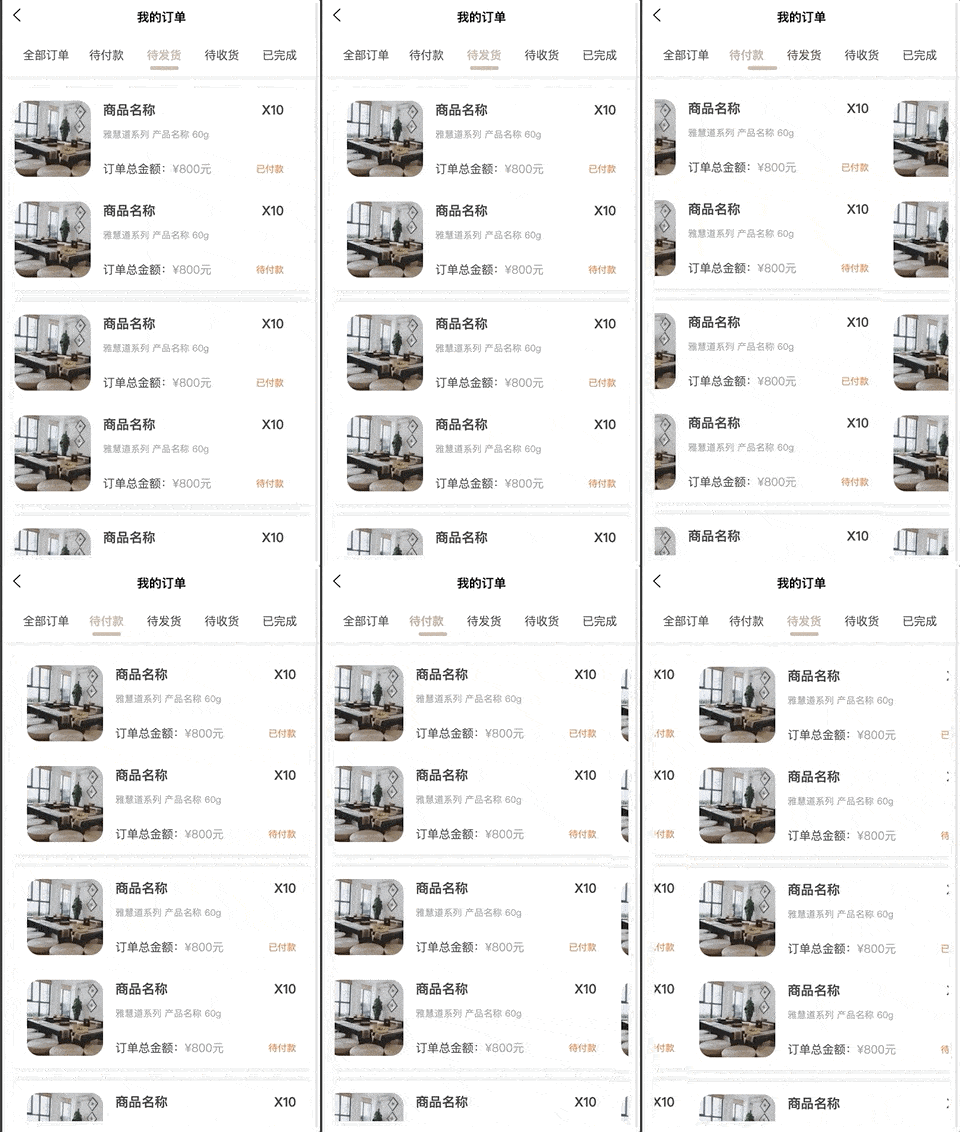
|
||||||
337
components/v-tabs/v-tabs.vue
Normal file
337
components/v-tabs/v-tabs.vue
Normal file
@@ -0,0 +1,337 @@
|
|||||||
|
<template>
|
||||||
|
<view :id="elId" class="v-tabs">
|
||||||
|
<scroll-view
|
||||||
|
id="scrollContainer"
|
||||||
|
:scroll-x="scroll"
|
||||||
|
:scroll-left="scroll ? scrollLeft : 0"
|
||||||
|
:scroll-with-animation="scroll"
|
||||||
|
:style="{ position: fixed ? 'fixed' : 'relative', zIndex: 99 }"
|
||||||
|
>
|
||||||
|
<view
|
||||||
|
class="v-tabs__container"
|
||||||
|
:style="{
|
||||||
|
display: scroll ? 'inline-flex' : 'flex',
|
||||||
|
whiteSpace: scroll ? 'nowrap' : 'normal',
|
||||||
|
background: bgColor,
|
||||||
|
height,
|
||||||
|
padding
|
||||||
|
}"
|
||||||
|
>
|
||||||
|
<view
|
||||||
|
class="v-tabs__container-item"
|
||||||
|
v-for="(v, i) in tabs"
|
||||||
|
:key="i"
|
||||||
|
:style="{
|
||||||
|
color: current == i ? activeColor : color,
|
||||||
|
fontSize: current == i ? fontSize : fontSize,
|
||||||
|
fontWeight: bold && current == i ? 'bold' : '',
|
||||||
|
justifyContent: !scroll ? 'center' : '',
|
||||||
|
flex: scroll ? '' : 1,
|
||||||
|
padding: paddingItem
|
||||||
|
}"
|
||||||
|
@click="change(i)"
|
||||||
|
>
|
||||||
|
{{ field ? v[field] : v.title }}
|
||||||
|
</view>
|
||||||
|
<view
|
||||||
|
v-if="!pills"
|
||||||
|
class="v-tabs__container-line"
|
||||||
|
:style="{
|
||||||
|
background: lineColor,
|
||||||
|
width: lineWidth + 'px',
|
||||||
|
height: lineHeight,
|
||||||
|
borderRadius: lineRadius,
|
||||||
|
left: lineLeft + 'px',
|
||||||
|
transform: `translateX(-${lineWidth / 2}px)`
|
||||||
|
}"
|
||||||
|
></view>
|
||||||
|
<view
|
||||||
|
v-else
|
||||||
|
class="v-tabs__container-pills"
|
||||||
|
:style="{
|
||||||
|
background: pillsColor,
|
||||||
|
borderRadius: pillsBorderRadius,
|
||||||
|
left: pillsLeft + 'px',
|
||||||
|
width: currentWidth + 'px',
|
||||||
|
height
|
||||||
|
}"
|
||||||
|
></view>
|
||||||
|
</view>
|
||||||
|
</scroll-view>
|
||||||
|
<view
|
||||||
|
class="v-tabs__placeholder"
|
||||||
|
:style="{
|
||||||
|
height: fixed ? height : '0',
|
||||||
|
padding
|
||||||
|
}"
|
||||||
|
></view>
|
||||||
|
</view>
|
||||||
|
</template>
|
||||||
|
|
||||||
|
<script>
|
||||||
|
/**
|
||||||
|
* v-tabs
|
||||||
|
* @property {Number} value 选中的下标
|
||||||
|
* @property {Array} tabs tabs 列表
|
||||||
|
* @property {String} bgColor = '#fff' 背景颜色
|
||||||
|
* @property {String} color = '#333' 默认颜色
|
||||||
|
* @property {String} activeColor = '#2979ff' 选中文字颜色
|
||||||
|
* @property {String} fontSize = '28rpx' 默认文字大小
|
||||||
|
* @property {String} activeFontSize = '28rpx' 选中文字大小
|
||||||
|
* @property {Boolean} bold = [true | false] 选中文字是否加粗
|
||||||
|
* @property {Boolean} scroll = [true | false] 是否滚动
|
||||||
|
* @property {String} height = '60rpx' tab 的高度
|
||||||
|
* @property {String} lineHeight = '10rpx' 下划线的高度
|
||||||
|
* @property {String} lineColor = '#2979ff' 下划线的颜色
|
||||||
|
* @property {Number} lineScale = 0.5 下划线的宽度缩放比例
|
||||||
|
* @property {String} lineRadius = '10rpx' 下划线圆角
|
||||||
|
* @property {Boolean} pills = [true | false] 是否胶囊样式
|
||||||
|
* @property {String} pillsColor = '#2979ff' 胶囊背景色
|
||||||
|
* @property {String} pillsBorderRadius = '10rpx' 胶囊圆角大小
|
||||||
|
* @property {String} field 如果是对象,显示的键名
|
||||||
|
* @property {Boolean} fixed = [true | false] 是否固定
|
||||||
|
* @property {String} paddingItem = '0 22rpx' 选项的边距
|
||||||
|
*
|
||||||
|
* @event {Function(current)} change 改变标签触发
|
||||||
|
*/
|
||||||
|
export default {
|
||||||
|
props: {
|
||||||
|
value: {
|
||||||
|
type: Number,
|
||||||
|
default: 0
|
||||||
|
},
|
||||||
|
tabs: {
|
||||||
|
type: Array,
|
||||||
|
default() {
|
||||||
|
return []
|
||||||
|
}
|
||||||
|
},
|
||||||
|
bgColor: {
|
||||||
|
type: String,
|
||||||
|
default: '#fff'
|
||||||
|
},
|
||||||
|
padding: {
|
||||||
|
type: String,
|
||||||
|
default: '0'
|
||||||
|
},
|
||||||
|
color: {
|
||||||
|
type: String,
|
||||||
|
default: '#333'
|
||||||
|
},
|
||||||
|
activeColor: {
|
||||||
|
type: String,
|
||||||
|
default: '#2979ff'
|
||||||
|
},
|
||||||
|
fontSize: {
|
||||||
|
type: String,
|
||||||
|
default: '28rpx'
|
||||||
|
},
|
||||||
|
activeFontSize: {
|
||||||
|
type: String,
|
||||||
|
default: '32rpx'
|
||||||
|
},
|
||||||
|
bold: {
|
||||||
|
type: Boolean,
|
||||||
|
default: true
|
||||||
|
},
|
||||||
|
scroll: {
|
||||||
|
type: Boolean,
|
||||||
|
default: true
|
||||||
|
},
|
||||||
|
height: {
|
||||||
|
type: String,
|
||||||
|
default: '70rpx'
|
||||||
|
},
|
||||||
|
lineColor: {
|
||||||
|
type: String,
|
||||||
|
default: '#2979ff'
|
||||||
|
},
|
||||||
|
lineHeight: {
|
||||||
|
type: String,
|
||||||
|
default: '10rpx'
|
||||||
|
},
|
||||||
|
lineScale: {
|
||||||
|
type: Number,
|
||||||
|
default: 0.5
|
||||||
|
},
|
||||||
|
lineRadius: {
|
||||||
|
type: String,
|
||||||
|
default: '10rpx'
|
||||||
|
},
|
||||||
|
pills: {
|
||||||
|
type: Boolean,
|
||||||
|
deafult: false
|
||||||
|
},
|
||||||
|
pillsColor: {
|
||||||
|
type: String,
|
||||||
|
default: '#2979ff'
|
||||||
|
},
|
||||||
|
pillsBorderRadius: {
|
||||||
|
type: String,
|
||||||
|
default: '10rpx'
|
||||||
|
},
|
||||||
|
field: {
|
||||||
|
type: String,
|
||||||
|
default: ''
|
||||||
|
},
|
||||||
|
fixed: {
|
||||||
|
type: Boolean,
|
||||||
|
default: false
|
||||||
|
},
|
||||||
|
paddingItem: {
|
||||||
|
type: String,
|
||||||
|
default: '0 22rpx'
|
||||||
|
}
|
||||||
|
},
|
||||||
|
data() {
|
||||||
|
return {
|
||||||
|
elId: '',
|
||||||
|
lineWidth: 30,
|
||||||
|
currentWidth: 0, // 当前选项的宽度
|
||||||
|
lineLeft: 0, // 滑块距离左侧的位置
|
||||||
|
pillsLeft: 0, // 胶囊距离左侧的位置
|
||||||
|
scrollLeft: 0, // 距离左边的位置
|
||||||
|
containerWidth: 0, // 容器的宽度
|
||||||
|
current: 0 // 当前选中项
|
||||||
|
}
|
||||||
|
},
|
||||||
|
watch: {
|
||||||
|
value(newVal) {
|
||||||
|
this.current = newVal
|
||||||
|
this.$nextTick(() => {
|
||||||
|
this.getTabItemWidth()
|
||||||
|
})
|
||||||
|
},
|
||||||
|
current(newVal) {
|
||||||
|
this.$emit('input', newVal)
|
||||||
|
},
|
||||||
|
tabs(newVal) {
|
||||||
|
this.$nextTick(() => {
|
||||||
|
this.getTabItemWidth()
|
||||||
|
})
|
||||||
|
}
|
||||||
|
},
|
||||||
|
methods: {
|
||||||
|
// 产生随机字符串
|
||||||
|
randomString(len) {
|
||||||
|
len = len || 32
|
||||||
|
let $chars =
|
||||||
|
'ABCDEFGHJKMNPQRSTWXYZabcdefhijkmnprstwxyz2345678' /****默认去掉了容易混淆的字符oOLl,9gq,Vv,Uu,I1****/
|
||||||
|
let maxPos = $chars.length
|
||||||
|
let pwd = ''
|
||||||
|
for (let i = 0; i < len; i++) {
|
||||||
|
pwd += $chars.charAt(Math.floor(Math.random() * maxPos))
|
||||||
|
}
|
||||||
|
return pwd
|
||||||
|
},
|
||||||
|
// 切换事件
|
||||||
|
change(index) {
|
||||||
|
if (this.current !== index) {
|
||||||
|
this.current = index
|
||||||
|
|
||||||
|
this.$emit('change', index)
|
||||||
|
}
|
||||||
|
},
|
||||||
|
// 获取左移动位置
|
||||||
|
getTabItemWidth() {
|
||||||
|
let query = uni
|
||||||
|
.createSelectorQuery()
|
||||||
|
// #ifndef MP-ALIPAY
|
||||||
|
.in(this)
|
||||||
|
// #endif
|
||||||
|
// 获取容器的宽度
|
||||||
|
query
|
||||||
|
.select(`#scrollContainer`)
|
||||||
|
.boundingClientRect((data) => {
|
||||||
|
if (!this.containerWidth && data) {
|
||||||
|
this.containerWidth = data.width
|
||||||
|
}
|
||||||
|
})
|
||||||
|
.exec()
|
||||||
|
// 获取所有的 tab-item 的宽度
|
||||||
|
query
|
||||||
|
.selectAll('.v-tabs__container-item')
|
||||||
|
.boundingClientRect((data) => {
|
||||||
|
if (!data) {
|
||||||
|
return
|
||||||
|
}
|
||||||
|
let lineLeft = 0
|
||||||
|
let currentWidth = 0
|
||||||
|
if (data) {
|
||||||
|
for (let i = 0; i < data.length; i++) {
|
||||||
|
if (i < this.current) {
|
||||||
|
lineLeft += data[i].width
|
||||||
|
} else if (i == this.current) {
|
||||||
|
currentWidth = data[i].width
|
||||||
|
} else {
|
||||||
|
break
|
||||||
|
}
|
||||||
|
}
|
||||||
|
}
|
||||||
|
// 当前滑块的宽度
|
||||||
|
this.currentWidth = currentWidth
|
||||||
|
// 缩放后的滑块宽度
|
||||||
|
this.lineWidth = currentWidth * this.lineScale * 1
|
||||||
|
// 滑块作移动的位置
|
||||||
|
this.lineLeft = lineLeft + currentWidth / 2
|
||||||
|
// 胶囊距离左侧的位置
|
||||||
|
this.pillsLeft = lineLeft
|
||||||
|
// 计算滚动的距离左侧的位置
|
||||||
|
if (this.scroll) {
|
||||||
|
this.scrollLeft = this.lineLeft - this.containerWidth / 2
|
||||||
|
}
|
||||||
|
})
|
||||||
|
.exec()
|
||||||
|
}
|
||||||
|
},
|
||||||
|
mounted() {
|
||||||
|
this.elId = 'xfjpeter_' + this.randomString()
|
||||||
|
this.current = this.value
|
||||||
|
this.$nextTick(() => {
|
||||||
|
this.getTabItemWidth()
|
||||||
|
})
|
||||||
|
}
|
||||||
|
}
|
||||||
|
</script>
|
||||||
|
|
||||||
|
<style lang="scss" scoped>
|
||||||
|
.v-tabs {
|
||||||
|
width: 100%;
|
||||||
|
box-sizing: border-box;
|
||||||
|
overflow: hidden;
|
||||||
|
::-webkit-scrollbar {
|
||||||
|
display: none;
|
||||||
|
}
|
||||||
|
&__container {
|
||||||
|
min-width: 100%;
|
||||||
|
position: relative;
|
||||||
|
display: inline-flex;
|
||||||
|
align-items: center;
|
||||||
|
white-space: nowrap;
|
||||||
|
overflow: hidden;
|
||||||
|
|
||||||
|
&-item {
|
||||||
|
display: flex;
|
||||||
|
align-items: center;
|
||||||
|
height: 100%;
|
||||||
|
position: relative;
|
||||||
|
z-index: 10;
|
||||||
|
// padding: 0 11px;
|
||||||
|
transition: all 0.3s;
|
||||||
|
white-space: nowrap;
|
||||||
|
}
|
||||||
|
|
||||||
|
&-line {
|
||||||
|
position: absolute;
|
||||||
|
bottom: 0;
|
||||||
|
transition: all 0.3s linear;
|
||||||
|
}
|
||||||
|
|
||||||
|
&-pills {
|
||||||
|
position: absolute;
|
||||||
|
transition: all 0.3s linear;
|
||||||
|
z-index: 9;
|
||||||
|
}
|
||||||
|
}
|
||||||
|
}
|
||||||
|
</style>
|
||||||
@@ -87,12 +87,22 @@
|
|||||||
</view>
|
</view>
|
||||||
</swiper-item>
|
</swiper-item>
|
||||||
</swiper>
|
</swiper>
|
||||||
<!-- 行业分类 -->
|
<v-tabs
|
||||||
<scroll-view class="industry-tabs" scroll-x>
|
v-model="industryIndex"
|
||||||
<view class="industry-item" :class="{'show':index === industryIndex}" v-for="(item, index) in industryBus" :key="index" @click="onBusIndustry(index)">{{item.title}}</view>
|
:tabs="industryBus"
|
||||||
</scroll-view>
|
color="#555555"
|
||||||
|
activeColor="#e93340"
|
||||||
|
fontSize="30rpx"
|
||||||
|
height="80rpx"
|
||||||
|
lineHeight="6rpx"
|
||||||
|
lineColor="#e93340"
|
||||||
|
bgColor="#f5f5f5"
|
||||||
|
@change="onBusIndustry"
|
||||||
|
></v-tabs>
|
||||||
<!-- 商家 -->
|
<!-- 商家 -->
|
||||||
<industry-list :list="busList" @on-industry="onOpenWechat"/>
|
<industry-list :list="busList" @on-industry="onOpenWechat"/>
|
||||||
|
<!-- 分页 -->
|
||||||
|
<uni-load-more v-if="busList.length > 0" :status="pageStatus" :iconSize="16"></uni-load-more>
|
||||||
</block>
|
</block>
|
||||||
<!-- 易货商城 -->
|
<!-- 易货商城 -->
|
||||||
<block v-if="tabIndex === 0">
|
<block v-if="tabIndex === 0">
|
||||||
@@ -207,16 +217,16 @@
|
|||||||
coupons : [],
|
coupons : [],
|
||||||
position : {},
|
position : {},
|
||||||
goods : [],
|
goods : [],
|
||||||
|
goodsPage : 1,
|
||||||
// 广场部分
|
// 广场部分
|
||||||
industryIndex: 0,
|
industryIndex: 0,
|
||||||
recommendBus : [],
|
recommendBus : [],
|
||||||
hotBus : [],
|
hotBus : [],
|
||||||
industryBus : [],
|
industryBus : [],
|
||||||
busList : [],
|
busList : [],
|
||||||
busPages : {},
|
busPage : 1,
|
||||||
// 分页
|
// 分页
|
||||||
pageStatus : '',
|
pageStatus : ''
|
||||||
page : 1
|
|
||||||
};
|
};
|
||||||
},
|
},
|
||||||
created() {
|
created() {
|
||||||
@@ -258,15 +268,21 @@
|
|||||||
// 企业广场行业
|
// 企业广场行业
|
||||||
onBusIndustry(index){
|
onBusIndustry(index){
|
||||||
this.industryIndex = index
|
this.industryIndex = index
|
||||||
|
this.busPage = 1
|
||||||
this.getCompaniesList()
|
this.getCompaniesList()
|
||||||
},
|
},
|
||||||
// 企业列表
|
// 企业列表
|
||||||
getCompaniesList(){
|
getCompaniesList(){
|
||||||
companiesList({
|
companiesList({
|
||||||
industry_id: this.industryBus[this.industryIndex].industry_id
|
industry_id: this.industryBus[this.industryIndex].industry_id,
|
||||||
|
page : this.busPage
|
||||||
}).then(res => {
|
}).then(res => {
|
||||||
this.busList = res.data
|
if(res.page.current === 1){
|
||||||
this.busPages = res.pages
|
this.busList = []
|
||||||
|
}
|
||||||
|
this.busList = this.busList.concat(res.data)
|
||||||
|
this.busPage = res.page.current
|
||||||
|
this.pageStatus = res.page.has_more ? 'more': 'noMore'
|
||||||
})
|
})
|
||||||
},
|
},
|
||||||
// 易货首页
|
// 易货首页
|
||||||
@@ -338,9 +354,15 @@
|
|||||||
onReachBottom() {
|
onReachBottom() {
|
||||||
if(this.pageStatus == 'more'){
|
if(this.pageStatus == 'more'){
|
||||||
this.pageStatus = 'loading'
|
this.pageStatus = 'loading'
|
||||||
if(this.tabIndex === 0) {
|
switch (this.tabIndex){
|
||||||
this.goodsPage += 1
|
case 0:
|
||||||
this.getGoods()
|
this.goodsPage += 1
|
||||||
|
this.getGoods()
|
||||||
|
break;
|
||||||
|
case 1:
|
||||||
|
this.busPage += 1
|
||||||
|
this.getCompaniesList()
|
||||||
|
break;
|
||||||
}
|
}
|
||||||
}
|
}
|
||||||
}
|
}
|
||||||
@@ -550,25 +572,6 @@
|
|||||||
}
|
}
|
||||||
}
|
}
|
||||||
}
|
}
|
||||||
// 行业分类
|
|
||||||
.industry-tabs{
|
|
||||||
white-space:nowrap;
|
|
||||||
.industry-item{
|
|
||||||
margin-left: $margin;
|
|
||||||
display: inline-block;
|
|
||||||
line-height: 50rpx;
|
|
||||||
font-size: $title-size-lg;
|
|
||||||
color: $text-gray;
|
|
||||||
&:last-child{
|
|
||||||
margin-right: $margin;
|
|
||||||
}
|
|
||||||
&.show{
|
|
||||||
color: $text-price;
|
|
||||||
font-size: $title-size;
|
|
||||||
font-weight: bold;
|
|
||||||
}
|
|
||||||
}
|
|
||||||
}
|
|
||||||
// 热易商家
|
// 热易商家
|
||||||
.hot-swiper{
|
.hot-swiper{
|
||||||
margin: 0 $margin $margin $margin;
|
margin: 0 $margin $margin $margin;
|
||||||
|
|||||||
File diff suppressed because one or more lines are too long
31173
unpackage/dist/dev/app-plus/app-service.js
vendored
31173
unpackage/dist/dev/app-plus/app-service.js
vendored
File diff suppressed because one or more lines are too long
34993
unpackage/dist/dev/app-plus/app-view.js
vendored
34993
unpackage/dist/dev/app-plus/app-view.js
vendored
File diff suppressed because one or more lines are too long

Binary file not shown.
|
Before Width: | Height: | Size: 5.0 KiB After Width: | Height: | Size: 91 KiB |
Reference in New Issue
Block a user